

QuickSend - SMS Widget for Sending & Receiving Twilio Text Messages in CRM
User Guide

Overview:
The SMS Widget enables CRM users to seamlessly send and receive SMS messages using Twilio directly within the CRM interface. It supports:
- Sending/receiving SMS in real time from CRM records
- Managing multiple Twilio numbers and setting a default sender number
- Assigning organization names to numbers and reassigning user with SMS Conversation carryover
- Creating and using predefined SMS templates
- Real-time message delivery tracking, and Intelligent error handling
🔧 Widget Setup & Configuration
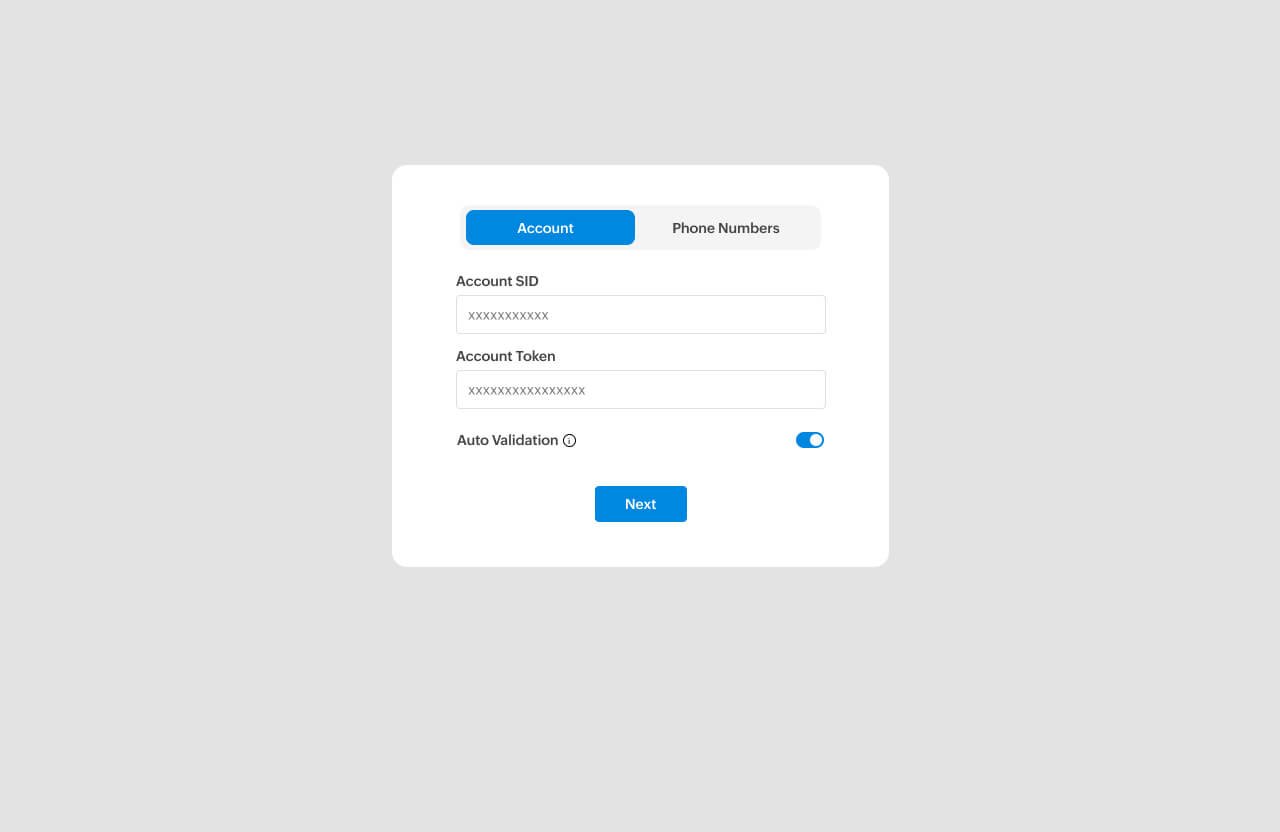
1. Access Settings
Upon installing the extension, users are automatically redirected to the ‘Settings’ tab to configure their Twilio credentials.
2.Twilio Account Setup
• Enter Twilio Account SID
• Enter Auth Token
On successful verification, extension will display a message “Twilio credentials verified and saved successfully.”
❗ If invalid, the widget will show:
“Authentication failed. Please check your Twilio SID and Auth Token.”
3. View Twilio Numbers and Friendly Name
- Once verified, the widget auto-fetches active (only) Twilio numbers, and associated friendly names in the drop-down menu.
- Note: SMS-capable numbers are auto identified
4. Assign Default Number
Choose your preferred number to set it as the default sender (‘From’ number).
- Select a default Twilio number to appear pre-filled when sending messages
- Note: This can be changed during message composition
5.Save Configuration
Click “Save” to apply changes. Your Twilio numbers and org names will be visible throughout the widget.
Note: If not configured within the installation settings, users are permitted to configure the settings within the related list in Leads or Contacts.
💬 Creating & Managing SMS Templates
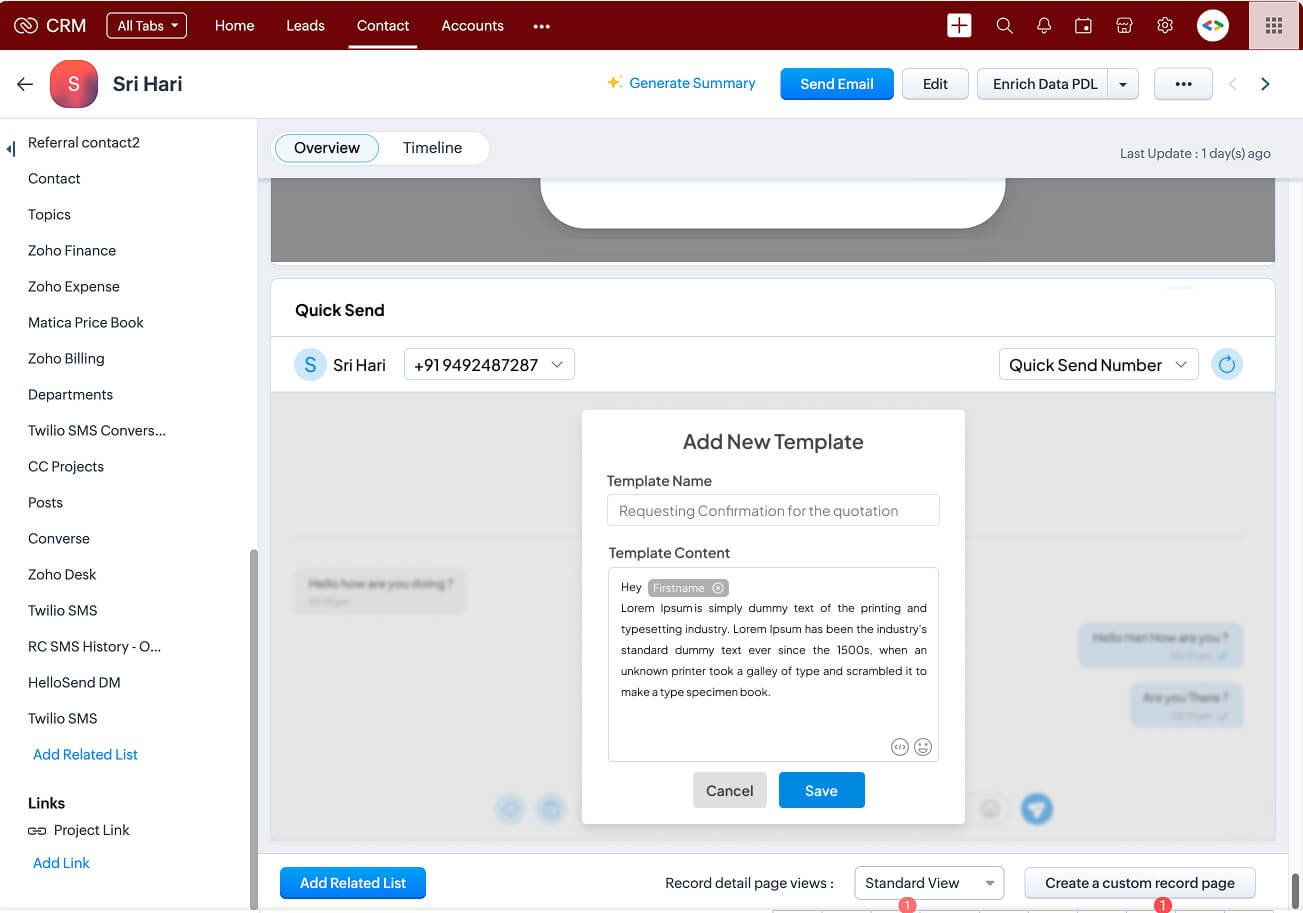
1. Creating a New Template
In the chat screen, click the “template icon” command icon.
Click the “+” icon to add a new template.
Enter a template name and message content.
Click “Save” to store the template.
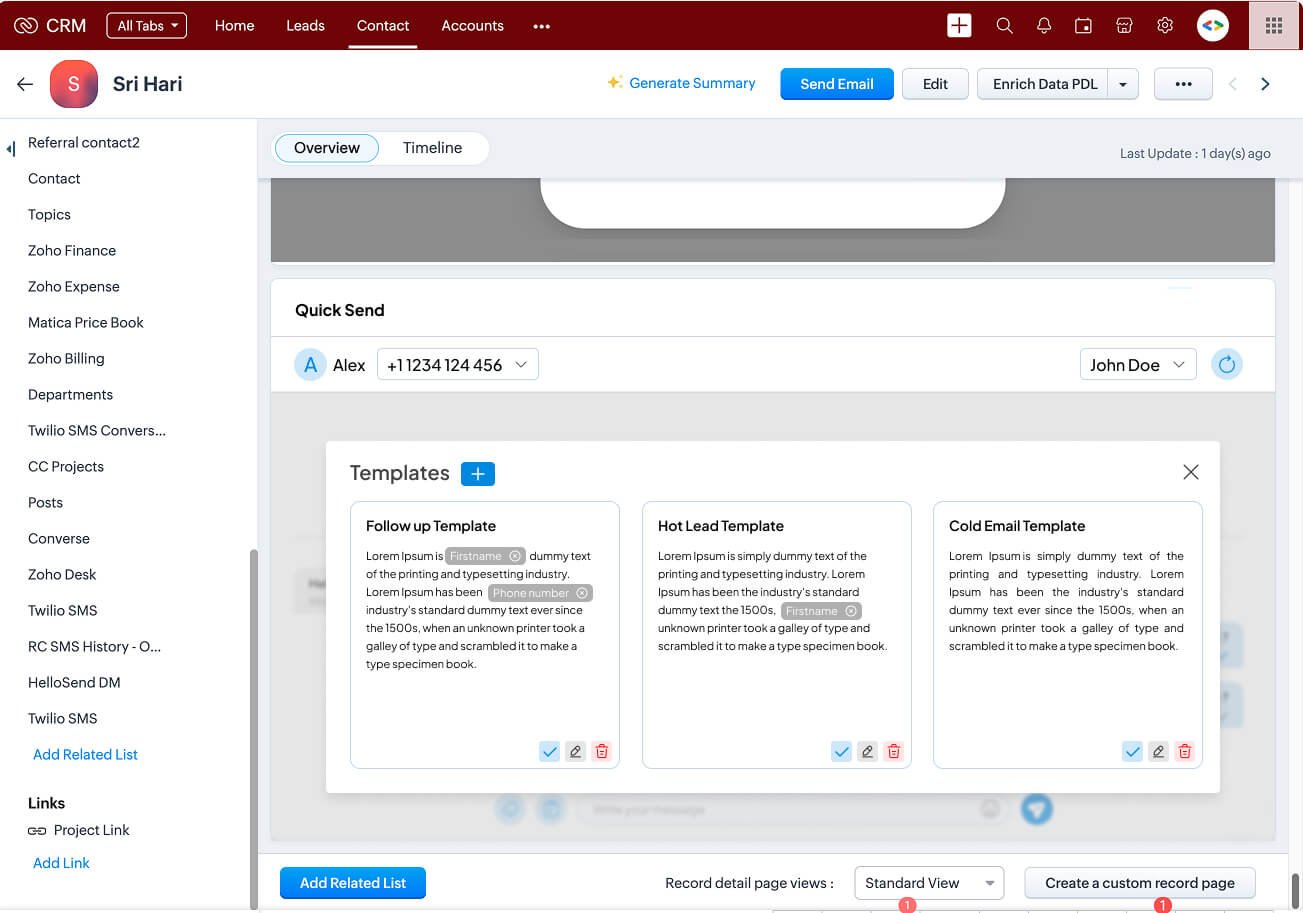
2. Using Templates While Sending SMS
Open the template panel via the “/” command icon.
Select the desired template and click the “✔” icon to insert it into the message field.
Edit the message if needed before sending.
• Note: Enhance and personalize SMS message by inserting module field values by clicking the “ “ and selecting from the list of fields in the related module record
3. Edit an existing template
Click the “/” command icon to view templates.
Select the template you wish to edit.
Click the “✎” edit icon.
Make your changes and click “Save”.
• Note: Enhance and personalize SMS message by inserting module field values by clicking the “ “ and selecting from the list of fields in the related module record
📤 Send and Receive SMS
How to Send an SMS
1. Open a Leads or Contacts record
2. Click the QuickSend SMS Widget under Related List
3. Select Sender Number
o Choose from your Twilio numbers (with Org Name tag shown)
4. Choose a Template or Type Your Message
5. Sending Media Files (Optional) Attach Media Files:
📷 Camera: Capture photo and send
📁 Document: Send PDFs, Word, Excel, PPT, TXT (limit 600 KB)
🖼 Media: Send photos, videos, GIFs from gallery (multiple allowed)
🎤 Audio: Share recordings or music files
6. Click Send
📥 Receiving SMS Messages
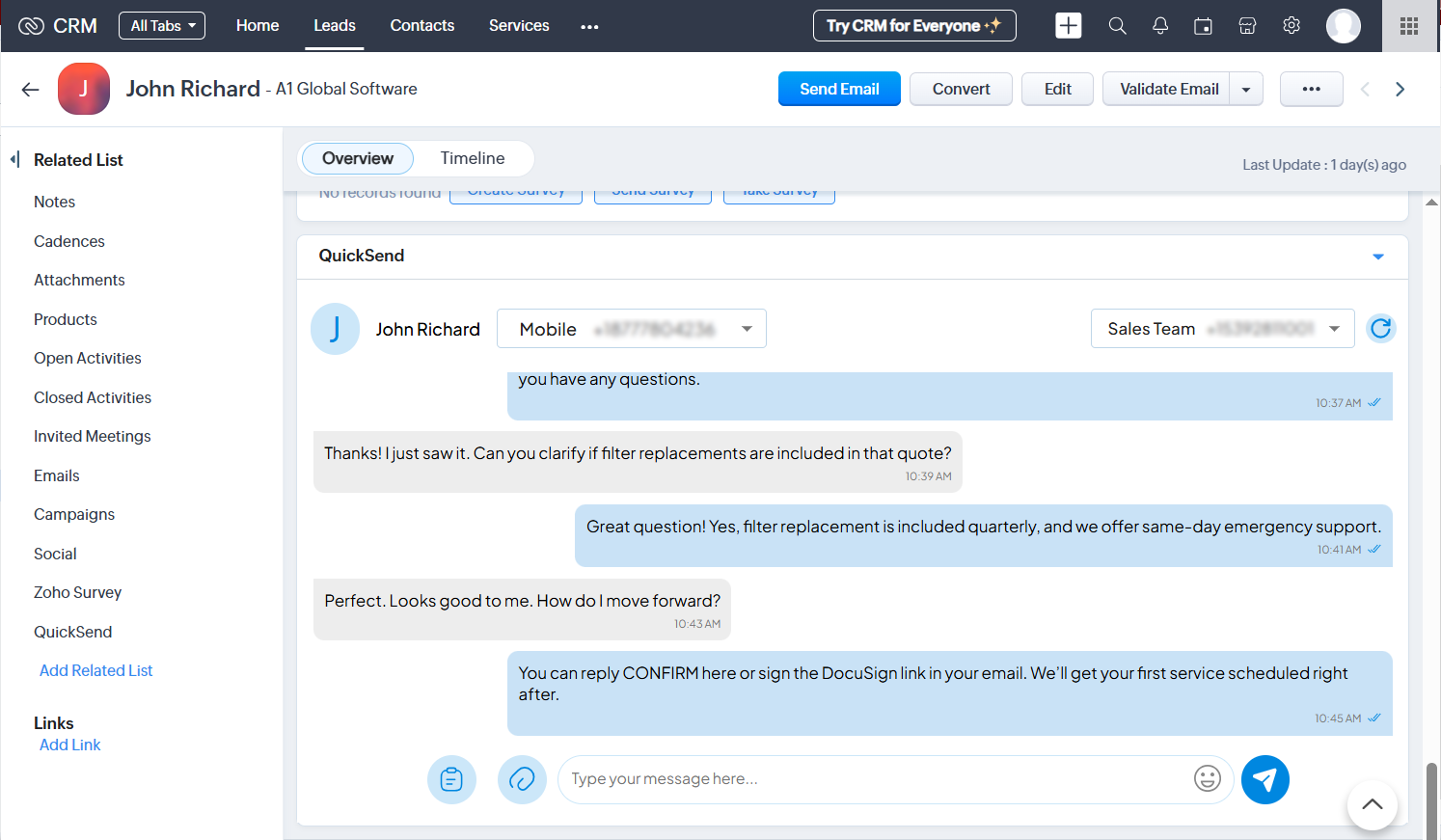
• Incoming replies appear in the same thread
• Messages are auto synced in real time
🔁 Message Threading & History
• Scroll up to load previous messages
• View includes:
- Direction (Sent/Received)
- Delivery status (Sent, Delivered, Failed)
- Timestamps
🔄 Reassigning CRM record to a new owner with SMS Conversation Carryover
🧩 Feature Summary
When the CRM record with a SMS number and associated texts is reassigned to a new record owner (e.g., team change, role update etc.), the extension provides a built-in option to carry over ongoing SMS conversations from the previously assigned user to the new one — ensuring no loss of context or communication.
🔧 How It Works
- If the From Number is updated, the system prompts:
“Do you want to carry over existing conversations from [Old User] to [New User]?”
3. Conversation Reassignment Options
- Record Owner can choose from:
- ✅ Yes: All open/active conversation threads linked to this Twilio number are retrieved.
- 🚫 No: Conversations remain restricted to the old number (archived state), and a new conversation is created.
4. Conversation History Sync
- If carry-over is selected:
All past messages are made visible to the new user
Role Access Level
Admin Full access to widget settings, Twilio integration
CRM User Can send/receive SMS, use templates, choose from assigned number
| MIME type category | MIME type |
|---|---|
| Images | image/jpeg |
| image/jpg | |
| image/gif | |
| image/png | |
| image/heic | |
| image/heif | |
| image/tiff | |
| image/bmp | |
| image/webp | |
| Video | video/mpeg4 |
| video/mp4 | |
| video/mpeg | |
| video/webm | |
| video/quicktime | |
| video/3gpp | |
| video/3gpp2 | |
| video/3gpp-tt | |
| video/H261 | |
| video/H263 | |
| video/H263-1998 | |
| video/H263-2000 | |
| video/H264 | |
| video/H265 | |
| audio/ogg | |
| audio/mpeg | |
| audio/mp4 | |
| audio/mp3 | |
| audio/3gpp | |
| audio/3gpp2 | |
| audio/basic | |
| audio/L24 | |
| audio/vnd.rn-realaudio | |
| audio/vnd.wave | |
| audio/ac3 | |
| audio/webm | |
| audio/amr-nb | |
| audio/amr | |
| Text | text/vcard |
| text/x-vcard | |
| text/directory | |
| text/csv | |
| text/richtext | |
| text/rtf | |
| text/calendar | |
| Application | application/pdf |
| application/vnd.apple.pkpass | |
| application/vcard | |
| application/msword | |
| application/vnd.ms-excel | |
| application/vnd.ms-powerpoint | |
| application/vnd.openxmlformats-officedocument.presentationml.presentation | |
| application/vnd.openxmlformats-officedocument.spreadsheetml.sheet | |
| application/vnd.openxmlformats-officedocument.wordprocessingml.document |
📈 Best Practices
• Assign meaningful org names to Twilio numbers for clarity (e.g., “Support – NY”, “Sales East”)
• Create SMS templates for common replies (follow-ups, appointment reminders, etc.)
• Always verify Twilio credentials and ensure numbers are active
• Use message placeholders to personalize templates automatically